Class Tabs
- All Implemented Interfaces:
Animation, Editable, StyleListener, Iterable<Component>
A component that lets the user switch between a group of components by clicking on a tab with a given title and/or icon.
Tabs/components are added to a Tabs object by using the
addTab and insertTab methods.
A tab is represented by an index corresponding
to the position it was added in, where the first tab has an index equal to 0
and the last tab has an index equal to the tab count minus 1.
The Tabs uses a SingleSelectionModel
to represent the set of tab indices and the currently selected index.
If the tab count is greater than 0, then there will always be a selected
index, which by default will be initialized to the first tab.
If the tab count is 0, then the selected index will be -1.
A simple Tabs sample looks a bit like this:
Form hi = new Form("Tabs", new BorderLayout());

Tabs t = new Tabs();
Style s = UIManager.getInstance().getComponentStyle("Tab");
FontImage icon1 = FontImage.createMaterial(FontImage.MATERIAL_QUESTION_ANSWER, s);

Container container1 = BoxLayout.encloseY(new Label("Label1"), new Label("Label2"));
t.addTab("Tab1", icon1, container1);
t.addTab("Tab2", new SpanLabel("Some text directly in the tab"));

hi.add(BorderLayout.CENTER, t);
The Tabs allows swiping on the X-axis (by default) but also on the Y-axis:
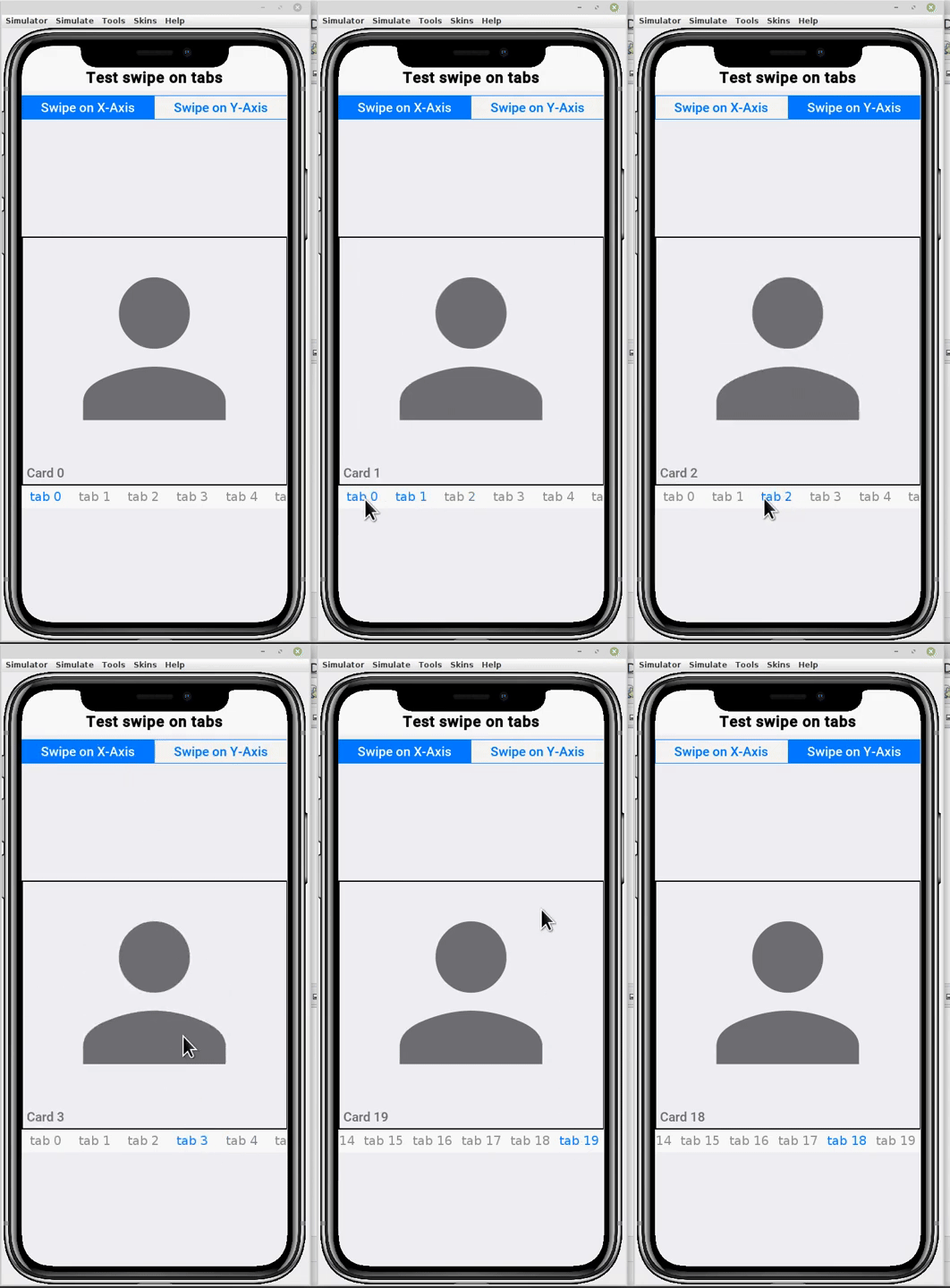
Form hi = new Form("Test swipe on tabs", BorderLayout.absolute());
Tabs tabs = new Tabs();
tabs.addTab("First", new Label("First tab"));
tabs.addTab("Second", new Label("Second tab"));

ButtonGroup btnGroup = new ButtonGroup();
RadioButton swipeXBtn = RadioButton.createToggle("Swipe on X-Axis", btnGroup);
RadioButton swipeYBtn = RadioButton.createToggle("Swipe on Y-Axis", btnGroup);
btnGroup.setSelected(swipeXBtn);

swipeXBtn.addActionListener(l -> tabs.setSwipeOnXAxis(true));
swipeYBtn.addActionListener(l -> tabs.setSwipeOnXAxis(false));

hi.add(BorderLayout.NORTH, GridLayout.encloseIn(2, swipeXBtn, swipeYBtn));
hi.add(BorderLayout.CENTER, tabs);
-
Field Summary
Fields inherited from class Component
BASELINE, BOTTOM, BRB_CENTER_OFFSET, BRB_CONSTANT_ASCENT, BRB_CONSTANT_DESCENT, BRB_OTHER, CENTER, CROSSHAIR_CURSOR, DEFAULT_CURSOR, DRAG_REGION_IMMEDIATELY_DRAG_X, DRAG_REGION_IMMEDIATELY_DRAG_XY, DRAG_REGION_IMMEDIATELY_DRAG_Y, DRAG_REGION_LIKELY_DRAG_X, DRAG_REGION_LIKELY_DRAG_XY, DRAG_REGION_LIKELY_DRAG_Y, DRAG_REGION_NOT_DRAGGABLE, DRAG_REGION_POSSIBLE_DRAG_X, DRAG_REGION_POSSIBLE_DRAG_XY, DRAG_REGION_POSSIBLE_DRAG_Y, E_RESIZE_CURSOR, HAND_CURSOR, LEFT, MOVE_CURSOR, N_RESIZE_CURSOR, NE_RESIZE_CURSOR, NW_RESIZE_CURSOR, RIGHT, S_RESIZE_CURSOR, SE_RESIZE_CURSOR, SW_RESIZE_CURSOR, TEXT_CURSOR, TOP, W_RESIZE_CURSOR, WAIT_CURSOR -
Constructor Summary
Constructors -
Method Summary
Modifier and TypeMethodDescriptionvoidaddSelectionListener(SelectionListener listener) Adds a selection listener to the tabs.voidAdds acomponentrepresented by abutton.Adds acomponentrepresented by atitleand/oricon, either of which can benull.Adds acomponentrepresented by atitleand/oricon, either of which can benull.voidAdds acomponentrepresented by atitleand noicon.voidAdds acomponentrepresented by atitleand/oricon, either of which can benull.Adds acomponentrepresented by atitleand/oricon, either of which can benull.voidaddTabsFocusListener(FocusListener listener) Adds a focus listener to the tabs buttonsbooleananimate()Allows the animation to reduce "repaint" calls when it returns false.protected voidBinds an action listener to the tab component.protected ComponentCreates a tab component by default this is a RadioButton but subclasses can use this to return anythingprotected ComponentCreates a tab component by default this is a RadioButton but subclasses can use this to return anythingprotected MotioncreateTabSlideMotion(int start, int end) Allows developers to customize the motion object for the slide effect to provide a linear slide effect.protected voidInvoked to indicate that the component initialization is being reversed since the component was detached from the container hierarchy.intReturns the selection-morph duration in milliseconds.This method retrieves the Tabs content paneString[]A component may expose mutable property names for a UI designer to manipulate, this API is designed for usage internally by the GUI builder codeString[]This method is here to workaround an XMLVM array type bug where property types aren't identified properly, it returns the names of the types using the following type names: String,int,double,long,byte,short,char,String[],String[][],byte[],Image,Image[],Object[],ListModel,ListCellRendererClass[]Matches the property names method (see that method for further details).getPropertyValue(String name) Returns the current value of the property name, this method is used by the GUI builderReturns the component associated with the tab at the given indexintReturns the currently selected index for this tabbedpane.getTabComponentAt(int index) Returns the tab atindex.intReturns the number of tabs in thistabbedpane.getTabIcon(int index) Returns the icon of the tab at the given indexprotected ImagegetTabIcon(Component tab) Returns the icon of the tab component.intReturns the placement of the tabs for this tabbedpane.This method retrieves the Tabs buttons ContainergetTabSelectedIcon(int index) Returns the icon of the tab at the given indexprotected ImageReturns the selected icon of the tab component.intReturns The position of the text relative to the icongetTabTitle(int index) Returns the title of the tab at the given indexprotected StringgetTabTitle(Component tab) Returns the title of the tab component.The UIID for a tab component which defaults to TabvoidhideTabs()Hide the tabs barintindexOfComponent(Component component) Returns the index of the tab for the specified component.protected voidAllows subclasses to bind functionality that relies on fully initialized and "ready for action" component stateprotected voidThis method initializes the Component defaults constantsvoidInserts acomponent, atindex, represented by abuttonUses java.util.Vector internally, seeinsertElementAtfor details of insertion conventions.voidInserts acomponent, atindex, represented by atitleand/oricon, either of which may benull.voidInserts acomponent, atindex, represented by atitleand/oricon, either of which may benull.booleanReturns whether the animated tab indicator is enabled.booleanIndicates whether clicking on a tab button should result in an animation to the selected tab or an immediate switchbooleanIndicates that the tabs container should have its style changed to the selected style when one of the tabs has focus this allows incorporating it into the theme of the applicationbooleanIndicates that a tab should change when the focus changes without the user physically pressing a buttonbooleanAllows marking tabs as swipe "eager" which instantly triggers swipe on movement rather than threshold the swipe.booleanReturns true if the swipe between tabs is activated, this is relevant for touch devices onlybooleanReturnstrueif the swipe is on the X-Axis,falseif the swipe is on the Y-Axis.voidrefreshTheme(boolean merge) Makes sure the component is up to date with the current theme, ONLY INVOKE THIS METHOD IF YOU CHANGED THE THEME!voidremoveSelectionListener(SelectionListener listener) Removes a selection Listener from the tabsvoidremoveTabAt(int index) Removes the tab atindex.voidremoveTabsFocusListener(FocusListener listener) Removes a foucs Listener from the tabs buttonsprotected voidInvoked to select a specific tab, this method should be overriden for subclasses overriding createTabvoidsetAnimatedIndicator(boolean enable) Enables the Material 3 sliding-underline indicator (off by default).voidsetAnimatedIndicatorDuration(int durationMs) Duration in milliseconds of the selection morph -- both the Material underline tween and the iOS 26 Liquid Glass selection-capsule spring.voidsetAnimateTabSelection(boolean animateTabSelection) Indicates whether clicking on a tab button should result in an animation to the selected tab or an immediate switchvoidsetChangeTabContainerStyleOnFocus(boolean changeTabContainerStyleOnFocus) Indicates that the tabs container should have its style changed to the selected style when one of the tabs has focus this allows incorporating it into the theme of the applicationvoidsetChangeTabOnFocus(boolean changeTabOnFocus) Indicates that a tab should change when the focus changes without the user physically pressing a buttonvoidsetEagerSwipeMode(boolean eagerSwipeMode) Allows marking tabs as swipe "eager" which instantly triggers swipe on movement rather than threshold the swipe.voidsetMorphTestState(int fromIndex, int toIndex, int value) TEST-ONLY hook: render the selection morph frozen at a fixed progress (value0..120, where 100 is the target and >100 is the settle overshoot) travelling fromfromIndextotoIndex, so a JavaSE probe can capture exact frames of the animation without racing the real-time motion.setPropertyValue(String name, Object value) Sets a new value to the given property, returns an error message if failed and null if successful.voidsetSelectedIndex(int index) Sets the selected index for this tabbedpane.voidsetSelectedIndex(int index, boolean slideToSelected) Sets the currently selected index in the tabs componentvoidsetSwipeActivated(boolean swipeActivated) Setter method for swipe modevoidsetSwipeOnXAxis(boolean b) It defaults totrue; you can set it tofalsefor use cases like the one discussed here: Realize a set of Containers that are browsable with a finger, like a deck of cardsvoidsetTabPlacement(int tabPlacement) Sets the tab placement for this tabbedpane.voidsetTabsContentGap(int tabsGap) This method allows setting the Tabs content pane spacing (right and left), This can be used to create an effect where the selected tab is smaller and the right and left tabs are visible on the sidesvoidsetTabSelectedIcon(int index, Image icon) Sets the selected icon of the tab at the given indexprotected voidsetTabSelectedIcon(Component tab, Image icon) Sets the selected icon of the tab.voidsetTabTextPosition(int textPosition) Sets the position of the text relative to the icon if existsprotected voidsetTabTitle(Component tab, String title, Image icon) Updates the tabs title .voidsetTabTitle(String title, Image icon, int index) Updates the information about the tab detailsvoidsetTabUIID(String tabUIID) The UIID for a tab button which defaults to Tab.protected voidsetTextPosition(Component tabComponent, int textPosition) Invokes set text position on the given tab, the tab should be a toggle button radio by default but can be anythingprotected booleanA component that might need side swipe such as the slider could block it from being used for some other purpose when on top of said component.voidshowTabs()Show the tabs bar if it was hiddentoString()Overriden to return a useful value for debugging purposesMethods inherited from class Container
add, add, add, add, add, add, addAll, addComponent, addComponent, addComponent, addComponent, animateHierarchy, animateHierarchyAndWait, animateHierarchyFade, animateHierarchyFadeAndWait, animateLayout, animateLayoutAndWait, animateLayoutFade, animateLayoutFadeAndWait, animateUnlayout, animateUnlayoutAndWait, applyRTL, calcPreferredSize, cancelRepaints, clearClientProperties, constrainHeightWhenScrollable, constrainWidthWhenScrollable, contains, createAnimateHierarchy, createAnimateHierarchyFade, createAnimateLayout, createAnimateLayoutFade, createAnimateLayoutFadeAndWait, createAnimateMotion, createAnimateUnlayout, createReplaceTransition, dragInitiated, drop, encloseIn, encloseIn, findDropTargetAt, findFirstFocusable, fireClicked, flushReplace, forceRevalidate, getBottomGap, getChildrenAsList, getClosestComponentTo, getComponentAt, getComponentAt, getComponentCount, getComponentIndex, getGridPosX, getGridPosY, getLayout, getLayoutHeight, getLayoutWidth, getLeadComponent, getLeadParent, getResponderAt, getSafeAreaRoot, getScrollIncrement, getSideGap, getUIManager, invalidate, isEnabled, isSafeArea, isSafeAreaRoot, isScrollableX, isScrollableY, isSelectableInteraction, isSurface, iterator, iterator, keyPressed, keyReleased, layoutContainer, morph, morphAndWait, paint, paintComponentBackground, paintGlass, paramString, pointerPressed, removeAll, removeComponent, replace, replace, replaceAndWait, replaceAndWait, replaceAndWait, revalidate, revalidateLater, revalidateWithAnimationSafety, scrollComponentToVisible, setCellRenderer, setEnabled, setLayout, setLeadComponent, setSafeArea, setSafeAreaRoot, setScrollable, setScrollableX, setScrollableY, setScrollIncrement, setShouldCalcPreferredSize, setShouldLayout, setUIManager, updateTabIndicesMethods inherited from class Component
accessibilityChanged, accessibilityChanged, addContextMenuListener, addDragFinishedListener, addDragOverListener, addDropListener, addFocusListener, addLongPressListener, addMouseWheelListener, addPointerDraggedListener, addPointerPressedListener, addPointerReleasedListener, addPullToRefresh, addScrollListener, addStateChangeListener, addStylusListener, announceForAccessibility, bindProperty, blocksSideSwipe, calcScrollSize, contains, containsOrOwns, createStyleAnimation, deinitializeCustomStyle, dragEnter, dragExit, dragFinished, draggingOver, drawDraggedImage, focusGained, focusLost, getAbsoluteX, getAbsoluteY, getAccessibilityNode, getAccessibilityText, getAllStyles, getAnimationManager, getBaseline, getBaselineResizeBehavior, getBindablePropertyNames, getBindablePropertyTypes, getBorder, getBoundPropertyValue, getBounds, getBounds, getClientProperty, getCloudBoundProperty, getCloudDestinationProperty, getComponentForm, getComponentState, getCursor, getDefaultDragTransparency, getDirtyRegion, getDisabledStyle, getDraggedx, getDraggedy, getDragImage, getDragRegionStatus, getDragSpeed, getDragTransparency, getEditingDelegate, getHeight, getInlineAllStyles, getInlineDisabledStyles, getInlinePressedStyles, getInlineSelectedStyles, getInlineStylesTheme, getInlineUnselectedStyles, getInnerHeight, getInnerPreferredH, getInnerPreferredW, getInnerWidth, getInnerX, getInnerY, getLabelForComponent, getName, getNativeOverlay, getNextFocusDown, getNextFocusLeft, getNextFocusRight, getNextFocusUp, getOuterHeight, getOuterPreferredH, getOuterPreferredW, getOuterWidth, getOuterX, getOuterY, getOwner, getParent, getPreferredH, getPreferredSize, getPreferredSizeStr, getPreferredTabIndex, getPreferredW, getPressedStyle, getSameHeight, getSameWidth, getScrollable, getScrollAnimationSpeed, getScrollDimension, getScrollOpacity, getScrollOpacityChangeSpeed, getScrollX, getScrollY, getSelectCommandText, getSelectedRect, getSelectedStyle, getSemantics, getStyle, getTabIndex, getTensileLength, getTextSelectionSupport, getTooltip, getUIID, getUnselectedStyle, getVisibleBounds, getVisibleBounds, getWidth, getX, getY, growShrink, handlesInput, hasFixedPreferredSize, hasFocus, hideNativeOverlay, initCustomStyle, initDisabledStyle, initPressedStyle, initSelectedStyle, initUnselectedStyle, installDefaultPainter, isAlwaysTensile, isBlockLead, isCellRenderer, isChildOf, isDragActivated, isDragAndDropOperation, isDraggable, isDragRegion, isDropTarget, isEditable, isEditing, isFlatten, isFocusable, isGrabsPointerEvents, isHidden, isHidden, isHideInLandscape, isHideInPortrait, isHScrollThumbGrabbed, isHScrollThumbHover, isIgnorePointerEvents, isInClippingRegion, isInitialized, isOpaque, isOwnedBy, isPinchBlocksDragAndDrop, isRippleEffect, isRTL, isScrollable, isScrollVisible, isSetCursorSupported, isSmoothScrolling, isSnapToGrid, isStickyDrag, isTactileTouch, isTactileTouch, isTensileDragEnabled, isTraversable, isVisible, isVScrollThumbGrabbed, isVScrollThumbHover, keyRepeated, laidOut, longKeyPress, longPointerPress, onScrollX, onScrollY, onSetFocusable, paintBackground, paintBackgrounds, paintBorder, paintBorderBackground, paintComponent, paintComponent, paintIntersectingComponentsAbove, paintLock, paintLockRelease, paintRippleOverlay, paintScrollbars, paintScrollbarX, paintScrollbarY, paintShadows, parsePreferredSize, pinch, pinch, pinchReleased, pointerDragged, pointerDragged, pointerHover, pointerHoverPressed, pointerHoverReleased, pointerPressed, pointerReleased, pointerReleased, putClientProperty, refreshTheme, refreshTheme, remove, removeContextMenuListener, removeDragFinishedListener, removeDragOverListener, removeDropListener, removeFocusListener, removeLongPressListener, removeMouseWheelListener, removePointerDraggedListener, removePointerPressedListener, removePointerReleasedListener, removeScrollListener, removeStateChangeListener, removeStylusListener, repaint, repaint, requestFocus, resetFocusable, respondsToPointerEvents, rotation, scrollRectToVisible, scrollRectToVisible, setAccessibilityText, setAlwaysTensile, setBlockLead, setBoundPropertyValue, setCloudBoundProperty, setCloudDestinationProperty, setComponentState, setCursor, setDefaultDragTransparency, setDirtyRegion, setDisabledStyle, setDraggable, setDragTransparency, setDropTarget, setEditingDelegate, setFlatten, setFocus, setFocusable, setGrabsPointerEvents, setHandlesInput, setHeight, setHidden, setHidden, setHideInLandscape, setHideInPortrait, setHorizontalScrollBounds, setIgnorePointerEvents, setInitialized, setInlineAllStyles, setInlineDisabledStyles, setInlinePressedStyles, setInlineSelectedStyles, setInlineStylesTheme, setInlineUnselectedStyles, setIsScrollVisible, setLabelForComponent, setName, setNextFocusDown, setNextFocusLeft, setNextFocusRight, setNextFocusUp, setOpaque, setOwner, setPinchBlocksDragAndDrop, setPreferredH, setPreferredSize, setPreferredSizeStr, setPreferredTabIndex, setPreferredW, setPressedStyle, setPullToRefresh, setRippleEffect, setRTL, setSameHeight, setSameSize, setSameWidth, setScrollAnimationSpeed, setScrollOpacityChangeSpeed, setScrollSize, setScrollVisible, setScrollX, setScrollY, setSelectCommandText, setSelectedStyle, setSize, setSmoothScrolling, setSnapToGrid, setTabIndex, setTactileTouch, setTensileDragEnabled, setTensileLength, setTooltip, setTraversable, setUIID, setUIID, setUIIDFinal, setUnselectedStyle, setVerticalScrollBounds, setVisible, setWidth, setX, setY, shouldBlockSideSwipeLeft, shouldBlockSideSwipeRight, shouldRenderComponentSelection, showNativeOverlay, startEditingAsync, stopEditing, stripMarginAndPadding, styleChanged, toImage, unbindProperty, updateNativeOverlay, visibleBoundsContains
-
Constructor Details
-
Tabs
public Tabs()Creates an emptyTabbedPanewith a default tab placement ofComponent.TOP. -
Tabs
public Tabs(int tabP) Creates an empty
TabbedPanewith the specified tab placement of either:Component.TOP,Component.BOTTOM,Component.LEFT, orComponent.RIGHT.Parameters
tabP: the placement for the tabs relative to the content
-
-
Method Details
-
shouldBlockSideSwipe
protected boolean shouldBlockSideSwipe()Description copied from class:ComponentA component that might need side swipe such as the slider could block it from being used for some other purpose when on top of said component.- Overrides:
shouldBlockSideSwipein classComponent
-
initLaf
-
refreshTheme
public void refreshTheme(boolean merge) Makes sure the component is up to date with the current theme, ONLY INVOKE THIS METHOD IF YOU CHANGED THE THEME!
Parameters
merge: indicates if the current styles should be merged with the new styles
- Overrides:
refreshThemein classContainer
-
deinitialize
protected void deinitialize()Invoked to indicate that the component initialization is being reversed since the component was detached from the container hierarchy. This allows the component to deregister animators and cleanup after itself. This method is the opposite of the initComponent() method.- Overrides:
deinitializein classComponent
-
initComponent
protected void initComponent()Allows subclasses to bind functionality that relies on fully initialized and "ready for action" component state- Overrides:
initComponentin classComponent
-
animate
public boolean animate()Allows the animation to reduce "repaint" calls when it returns false. It is called once for every frame. Frames are defined by the
com.codename1.ui.Displayclass.Returns
true if a repaint is desired or false if no repaint is necessary
-
setTextPosition
Invokes set text position on the given tab, the tab should be a toggle button radio by default but can be anything
Parameters
-
tabComponent: the component representing the tab -
textPosition: the text position
-
-
getTabTextPosition
public int getTabTextPosition()Returns The position of the text relative to the icon
Returns
The position of the text relative to the icon, one of: LEFT, RIGHT, BOTTOM, TOP
See also
-
#LEFT
-
#RIGHT
-
#BOTTOM
-
#TOP
-
-
setTabTextPosition
public void setTabTextPosition(int textPosition) Sets the position of the text relative to the icon if exists
Parameters
textPosition: alignment value (LEFT, RIGHT, BOTTOM or TOP)
See also
-
#LEFT
-
#RIGHT
-
#BOTTOM
-
#TOP
-
addTab
Adds a
componentrepresented by atitleand/oricon, either of which can benull. Cover method forinsertTab.Parameters
-
title: the title to be displayed in this tab -
icon: the icon to be displayed in this tab -
component: the component to be displayed when this tab is clicked
See also
-
#insertTab
-
#removeTabAt
-
-
addTab
Adds a
componentrepresented by atitleand/oricon, either of which can benull. Cover method forinsertTab.Parameters
-
title: the title to be displayed in this tab -
icon: the icon to be displayed in this tab -
pressedIcon: the icon shown when the tab is selected -
component: the component to be displayed when this tab is clicked
Returns
this so these calls can be chained
See also
-
#insertTab
-
#removeTabAt
-
-
addTab
Adds a
componentrepresented by atitleand/oricon, either of which can benull. Cover method forinsertTab.Parameters
-
title: the title to be displayed in this tab -
materialIcon: one of the material design icon constants fromcom.codename1.ui.FontImage -
iconSize: icon size in millimeters -
component: the component to be displayed when this tab is clicked
Returns
this so these calls can be chained
See also
-
#insertTab
-
#removeTabAt
-
-
addTab
Adds a
componentrepresented by atitleand/oricon, either of which can benull. Cover method forinsertTab.Parameters
-
title: the title to be displayed in this tab -
icon: an icon from the font -
font: the font for the icon -
iconSize: icon size in millimeters -
component: the component to be displayed when this tab is clicked
Returns
this so these calls can be chained
See also
-
#insertTab
-
#removeTabAt
-
-
addTab
-
addTab
Adds a
componentrepresented by abutton. Cover method forinsertTab. The Button styling will be associated with "Tab" UIID.Parameters
-
tab: represents the tab on top -
component: the component to be displayed when this tab is clicked
Deprecated
should use radio button as an argument
See also
-
#insertTab
-
#removeTabAt
-
-
createTab
Creates a tab component by default this is a RadioButton but subclasses can use this to return anything
Parameters
-
title: the title of the tab -
icon: an icon from the font -
font: the font for the icon
Returns
component instance
-
-
createTab
-
insertTab
Inserts a
component, atindex, represented by atitleand/oricon, either of which may benull. Uses java.util.Vector internally, seeinsertElementAtfor details of insertion conventions.Parameters
-
title: the title to be displayed in this tab -
icon: the icon to be displayed in this tab -
component: The component to be displayed when this tab is clicked. -
index: the position to insert this new tab
See also
-
#addTab
-
#removeTabAt
-
-
insertTab
public void insertTab(String title, char icon, Font font, float iconSize, Component component, int index) Inserts a
component, atindex, represented by atitleand/oricon, either of which may benull. Uses java.util.Vector internally, seeinsertElementAtfor details of insertion conventions.Parameters
-
title: the title to be displayed in this tab -
icon: an icon from the font -
font: the font for the icon -
component: The component to be displayed when this tab is clicked. -
index: the position to insert this new tab
See also
-
#addTab
-
#removeTabAt
-
-
insertTab
Inserts a
component, atindex, represented by abuttonUses java.util.Vector internally, seeinsertElementAtfor details of insertion conventions. The Button styling will be associated with "Tab" UIID.Parameters
-
tab: represents the tab on top -
component: The component to be displayed when this tab is clicked. -
index: the position to insert this new tab
Deprecated
should use radio button as an argument
See also
-
#addTab
-
#removeTabAt
-
-
bindTabActionListener
Binds an action listener to the tab component. this method should be used when overriding createTab
Parameters
-
tab: the tab component -
l: the listener
-
-
setTabTitle
-
setTabTitle
-
getTabTitle
Returns the title of the tab at the given index
Parameters
index: index for the tab
Returns
label of the tab at the given index
-
getTabTitle
-
getTabIcon
-
getTabIcon
Returns the icon of the tab at the given index
Parameters
index: index for the tab
Returns
icon of the tab at the given index
-
getTabSelectedIcon
-
getTabSelectedIcon
Returns the icon of the tab at the given index
Parameters
index: index for the tab
Returns
icon of the tab at the given index
-
setTabSelectedIcon
Sets the selected icon of the tab at the given index
Parameters
-
index: index for the tab -
icon: of the tab at the given index
-
-
setTabSelectedIcon
-
removeTabAt
public void removeTabAt(int index) Removes the tab at
index. After the component associated withindexis removed, its visibility is reset to true to ensure it will be visible if added to other containers.Parameters
index: the index of the tab to be removed
Throws
IndexOutOfBoundsException: @throws IndexOutOfBoundsException if index is out of range (index = tab count)
See also
-
#addTab
-
#insertTab
-
getTabComponentAt
Returns the tab at
index.Parameters
index: the index of the tab to be removed
Returns
the component at the given tab location
Throws
IndexOutOfBoundsException: @throws IndexOutOfBoundsException if index is out of range (index = tab count)
See also
-
#addTab
-
#insertTab
-
indexOfComponent
Returns the index of the tab for the specified component. Returns -1 if there is no tab for this component.
Parameters
component: the component for the tab
Returns
- Returns:
- the first tab which matches this component, or -1 if there is no tab for this component
-
getTabCount
public int getTabCount()Returns the number of tabs in this
tabbedpane.Returns
an integer specifying the number of tabbed pages
-
getSelectedIndex
public int getSelectedIndex()Returns the currently selected index for this tabbedpane. Returns -1 if there is no currently selected tab.
Returns
the index of the selected tab
-
setSelectedIndex
public void setSelectedIndex(int index) Sets the selected index for this tabbedpane. The index must be a valid tab index.
Parameters
index: the index to be selected
Throws
IndexOutOfBoundsException: @throws IndexOutOfBoundsException if index is out of range (index = tab count)
-
getSelectedComponent
Returns the component associated with the tab at the given index
Returns
the component is now showing in the tabbed pane
-
addTabsFocusListener
Adds a focus listener to the tabs buttons
Parameters
listener: FocusListener
Deprecated
use addSelectionListener instead
-
removeTabsFocusListener
Removes a foucs Listener from the tabs buttons
Parameters
listener: FocusListener
Deprecated
use addSelectionListener instead
-
addSelectionListener
Adds a selection listener to the tabs.
Parameters
listener: SelectionListener
-
removeSelectionListener
Removes a selection Listener from the tabs
Parameters
listener: SelectionListener
-
toString
-
getTabPlacement
public int getTabPlacement()Returns the placement of the tabs for this tabbedpane.
Returns
the tab placement value
See also
- #setTabPlacement
-
setTabPlacement
public void setTabPlacement(int tabPlacement) Sets the tab placement for this tabbedpane. Possible values are:
-
Component.TOP -
Component.BOTTOM -
Component.LEFT -
Component.RIGHT
The default value, if not set, is
Component.TOP.Parameters
tabPlacement: the placement for the tabs relative to the content
-
-
getContentPane
This method retrieves the Tabs content pane
Returns
the content pane Container
-
getTabsContainer
This method retrieves the Tabs buttons Container
Returns
the Tabs Container
-
setSelectedIndex
public void setSelectedIndex(int index, boolean slideToSelected) Sets the currently selected index in the tabs component
Parameters
-
index: the index for the tab starting with tab 0. -
slideToSelected: @param slideToSelected true to animate the transition to the new selection false to just move immediately
-
-
selectTab
Invoked to select a specific tab, this method should be overriden for subclasses overriding createTab
Parameters
tab: the tab
-
setAnimatedIndicator
public void setAnimatedIndicator(boolean enable) Enables the Material 3 sliding-underline indicator (off by default). When on, selection changes tween the indicator from the old tab's bounds to the new tab's bounds over
tabsAnimatedIndicatorDurationIntmilliseconds (default 200, ease-in-out cubic).Color is taken from the
TabIndicatorUIID's foreground color when it exists, otherwise from the currently-selected tab's foreground color. Thickness is 1mm; override with thetabsAnimatedIndicatorThicknessMmtheme constant (in millimeters). -
isAnimatedIndicator
public boolean isAnimatedIndicator()Returns whether the animated tab indicator is enabled. See#setAnimatedIndicator(boolean). -
setAnimatedIndicatorDuration
public void setAnimatedIndicatorDuration(int durationMs) Duration in milliseconds of the selection morph -- both the Material underline tween and the iOS 26 Liquid Glass selection-capsule spring. Defaults to thetabsAnimatedIndicatorDurationInttheme constant. -
getAnimatedIndicatorDuration
public int getAnimatedIndicatorDuration()Returns the selection-morph duration in milliseconds. See#setAnimatedIndicatorDuration(int). -
setMorphTestState
public void setMorphTestState(int fromIndex, int toIndex, int value) TEST-ONLY hook: render the selection morph frozen at a fixed progress (value0..120, where 100 is the target and >100 is the settle overshoot) travelling fromfromIndextotoIndex, so a JavaSE probe can capture exact frames of the animation without racing the real-time motion. Passvalue< 0 to clear and resume normal behaviour. -
hideTabs
public void hideTabs()Hide the tabs bar -
showTabs
public void showTabs()Show the tabs bar if it was hidden -
isSwipeActivated
public boolean isSwipeActivated()Returns true if the swipe between tabs is activated, this is relevant for touch devices only
Returns
swipe activated flag
-
setSwipeActivated
public void setSwipeActivated(boolean swipeActivated) Setter method for swipe mode
Parameters
swipeActivated
-
isChangeTabOnFocus
public boolean isChangeTabOnFocus()Indicates that a tab should change when the focus changes without the user physically pressing a button
Returns
the changeTabOnFocus
-
setChangeTabOnFocus
public void setChangeTabOnFocus(boolean changeTabOnFocus) Indicates that a tab should change when the focus changes without the user physically pressing a button
Parameters
changeTabOnFocus: the changeTabOnFocus to set
-
isChangeTabContainerStyleOnFocus
public boolean isChangeTabContainerStyleOnFocus()Indicates that the tabs container should have its style changed to the selected style when one of the tabs has focus this allows incorporating it into the theme of the application
Returns
the changeTabContainerStyleOnFocus
-
setChangeTabContainerStyleOnFocus
public void setChangeTabContainerStyleOnFocus(boolean changeTabContainerStyleOnFocus) Indicates that the tabs container should have its style changed to the selected style when one of the tabs has focus this allows incorporating it into the theme of the application
Parameters
changeTabContainerStyleOnFocus: the changeTabContainerStyleOnFocus to set
-
setTabsContentGap
public void setTabsContentGap(int tabsGap) This method allows setting the Tabs content pane spacing (right and left), This can be used to create an effect where the selected tab is smaller and the right and left tabs are visible on the sides
Parameters
tabsGap: @param tabsGap the gap on the sides of the content in pixels, the value must be positive.
-
getTabUIID
The UIID for a tab component which defaults to Tab
Returns
the tabUIID
-
setTabUIID
The UIID for a tab button which defaults to Tab. Tab buttons used to have two separate styles for selected and unselected. This was later consolidated so the tabs behave as a single toggle button (radio button) however one thing that remained is a call to
setUIIDthat is implicitly made to restore the original "Tab" style.Effectively Tabs invokes the
setUIIDcall on the Tab switch so if you want to manipulate the tab UIID manually (have one red and one green tab) this is a problem..To enable such code add all the tabs then just just invoke
setTabUIID(null)to disable this behavior.Parameters
tabUIID: the tabUIID to set
-
isEagerSwipeMode
public boolean isEagerSwipeMode()Allows marking tabs as swipe "eager" which instantly triggers swipe on movement rather than threshold the swipe.
Returns
the eagerSwipeMode
-
setEagerSwipeMode
public void setEagerSwipeMode(boolean eagerSwipeMode) Allows marking tabs as swipe "eager" which instantly triggers swipe on movement rather than threshold the swipe.
Parameters
eagerSwipeMode: the eagerSwipeMode to set
-
isAnimateTabSelection
public boolean isAnimateTabSelection()Indicates whether clicking on a tab button should result in an animation to the selected tab or an immediate switch
Returns
the animateTabSelection
-
setAnimateTabSelection
public void setAnimateTabSelection(boolean animateTabSelection) Indicates whether clicking on a tab button should result in an animation to the selected tab or an immediate switch
Parameters
animateTabSelection: the animateTabSelection to set
-
createTabSlideMotion
Allows developers to customize the motion object for the slide effect to provide a linear slide effect. You can use the
tabsSlideSpeedInttheme constant to define the time in milliseconds between releasing the swiped tab and reaching the next tab. This currently defaults to 200.Parameters
-
start: start position -
end: end position for the motion
Returns
the motion object
-
-
isSwipeOnXAxis
public boolean isSwipeOnXAxis()Returns
trueif the swipe is on the X-Axis,falseif the swipe is on the Y-Axis.Returns
swipe direction flag
-
setSwipeOnXAxis
public void setSwipeOnXAxis(boolean b) It defaults to
true; you can set it tofalsefor use cases like the one discussed here: Realize a set of Containers that are browsable with a finger, like a deck of cardsExample of usage (demo video):
Form hi = new Form("Test swipe on tabs", BorderLayout.absolute());
Tabs tabs = new Tabs();
ButtonGroup btnGroup = new ButtonGroup();
Button swipeXBtn = RadioButton.createToggle("Swipe on X-Axis", btnGroup);
Button swipeYBtn = RadioButton.createToggle("Swipe on Y-Axis", btnGroup);
btnGroup.setSelected(0);

swipeXBtn.addActionListener(l -> {
    tabs.setSwipeOnXAxis(true);
});

swipeYBtn.addActionListener(l -> {
    tabs.setSwipeOnXAxis(false);
});

hi.add(BorderLayout.NORTH, GridLayout.encloseIn(2, swipeXBtn, swipeYBtn));

//tabs.hideTabs();
hi.add(BorderLayout.CENTER, tabs);

List cards = new ArrayList<>();
for (int i=0; i<20; i++) {
    Container card = new Container(BoxLayout.y());
    card.getAllStyles().setBorder(Border.createLineBorder(CN.convertToPixels(1)/5, 0));
    card.addAll(FlowLayout.encloseCenter(new Label(FontImage.createMaterial(FontImage.MATERIAL_PERSON, "Label", 50.0f))), new Label("Card " + i));
    cards.add(card);
    tabs.addTab("tab " + i, card);
}

hi.show();
Parameters
b:trueto set the swipe on the X-Axis,falseto set the swipe on the Y-Axis
-
getPropertyNames
A component may expose mutable property names for a UI designer to manipulate, this API is designed for usage internally by the GUI builder code
Returns
the property names allowing mutation
- Overrides:
getPropertyNamesin classComponent
-
getPropertyTypes
Matches the property names method (see that method for further details).
Returns
the types of the properties
- Overrides:
getPropertyTypesin classComponent
-
getPropertyTypeNames
This method is here to workaround an XMLVM array type bug where property types aren't identified properly, it returns the names of the types using the following type names: String,int,double,long,byte,short,char,String[],String[][],byte[],Image,Image[],Object[],ListModel,ListCellRenderer
Returns
Array of type names
- Overrides:
getPropertyTypeNamesin classComponent
-
getPropertyValue
Returns the current value of the property name, this method is used by the GUI builder
Parameters
name: the name of the property
Returns
the value of said property
- Overrides:
getPropertyValuein classComponent
-
setPropertyValue
Sets a new value to the given property, returns an error message if failed and null if successful. Notice that some builtin properties such as "$designMode" might be sent to components to indicate application state.
Parameters
-
name: the name of the property -
value: new value for the property
Returns
error message or null
- Overrides:
setPropertyValuein classComponent
-
-